

Most manufacturers, distributors, and wholesalers know the struggle: one user needs to place orders for multiple locations, departments, or divisions—but there is no simple (or quick) way to do that. The result is a bunch of workarounds consisting of multiple logins, a bunch of plus-tagged email addresses, or extra admin accounts. Nothing is efficient or easy.
Nomad’s customer-level impersonation fixes all that by giving sales reps, support teams, the customers’ management teams, franchise owners, and multi-location buyers a simple way to move between customer accounts without having to log in and out, switch credentials, or juggle dozens of passwords. One login with needed visibility and all the right customer data.
And, yes, it is easy to roll out on any Nomad-powered website.
What Is Customer-Level Impersonation in B2B eCommerce?
Customer-level impersonation lets a user log in once and switch between the customer accounts they’re responsible for, directly from a dropdown menu located at the top of the site.
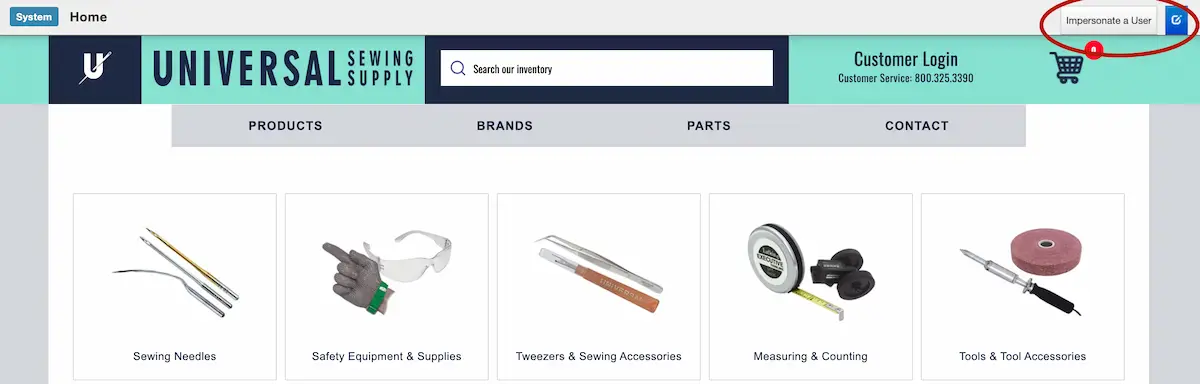
They can:
- View accurate pricing and terms for each customer
- See real-time inventory per customer account
- Build or manage carts for each customer separately
- Place orders on behalf of a customer
- Review order history by customer
- Manage carts or lists across multiple locations
Switching accounts doesn’t cause you to lose anything. Each customer has its own cart, and those carts remain intact when users move between accounts.
This speeds up the process for teams who handle multiple accounts every day and need their eCommerce site to support the way they already sell in person or over the phone.
Who Benefits from Customer-Level Impersonation
Customer-level impersonation supports the way your business already sells by helping two groups: your internal teams and your customers’ buying teams.
Internal sales reps
Your sales team can switch between the accounts they manage, see the correct pricing and terms, and place orders on behalf of customers without needing separate logins or ERP access.
Internal support teams
Your customer support team can view exactly what a customer sees (products, pricing, carts, order history) so they can answer questions faster and resolve issues without all that back-and-forth.
Your customers’ managers who oversee multiple locations
Some customers need to be able to look across all their branches, divisions, or warehouses. Impersonation gives them a clean way to move between locations and place accurate orders for each one.
Your customers who operate with separate department-level accounts
Many B2B buyers split purchasing responsibilities. For example, different reporting structures, cost centers, or divisions may each have their own account. Impersonation lets an authorized person easily switch between those accounts without having to borrow or manage multiple logins.
How Nomad's Customer Impersonation Works for the User
The user logs in normally. At the top of the screen, they see a search bar showing the first ten accounts assigned to them. They can then:
- Type to narrow the list
- Select an account
- Click "Change"
The site immediately switches into that customer’s view, showing their product catalog, pricing, terms, purchase history, carts, etc.
Why This Matters for Manufacturers, Distributors, and Wholesalers
Customer-level impersonation supports the way manufacturers, distributors, and wholesalers actually sell:
More accurate orders. Reps are able to order with the right pricing, inventory, and terms every time.
Fewer calls and emails. Customers can get help quickly because their rep or support person sees what they see.
Better visibility. Managers at each customer account can check activity across locations without having to establish workarounds to log in as different users.
Faster onboarding. New reps can be active immediately—no special ERP training or credentials required. They have access to all needed data in the ERP without needing to access the ERP (or other backend systems).
Cleaner security with fewer admin headaches. Each user sees only the accounts they’re authorized to manage.
See Customer Impersonation in Action
If your customers have strict oversight requirements or your internal teams support a high volume of accounts, customer-level impersonation removes friction and makes your eCommerce site easier to use.
Want to see how it works on a live Nomad site?
Request a demo (below) and we'll walk you through it.